
BlogService
At the end of the wizard a Windows service “BLogService” and a “BLogServiceML” will be installed.

Administrative privileges are required for the installation process to create the service; if errors occour, the service can be created manually from a command prompt run as administrator.
Sc create BLogService binpath=”C:\Program Files (x86)\Enterprise\BusinessLog\BlogService.exe”
NOTE: The path may be different if you changed it during installation.
Alternatively you can use:
c:\Windows\Microsoft.NET\Framework\v4.0.30319\InstallUtil.exe "C:\Program Files (x86)\Enterprise\BusinessLog\BLogService.exe"
Similarly, if necessary, you can also uninstall it with the command:
Sc delete BlogService
Occorre togliere l’accesso locale (potrebbe raccogliere solo i log dalla macchina locale) ed attivare:
In addition, the newly installed service must be configured to start automatically under a user account that belongs to the Admins group in Active Directory, as it must have the credentials required to access the system registry on all machines.
Local access must be disabled (otherwise, only logs from the local machine would be collected) and the following options must be enabled:
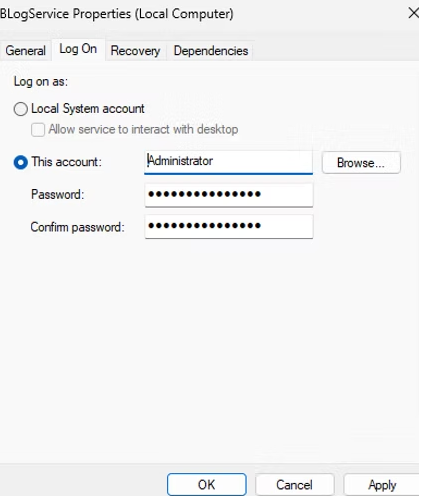
Enter the username and password of a domain-admin account. You can simply "clone" one of your accounts already in the Domain Admins group and set a complex password.
The most professional and secure approach is to use a gMSA account, properly configured in Active Directory, which can provide the required credentials without specifying a password.