
USB Access List
When this option is enabled, access to removable devices (such as USB flash drives, external disks, SD cards, and MicroSD cards) can be detected across all machines on the network.

Activation
A dedicated guide for enabling the recording of these events is available via the [i] button.

To enable logging of removable storage, the following steps are required:
1. Enable the “Audit Removable Storage” option in Group Policy under Advanced Configuration > Object Access.

2. Modify the registry key by enabling the HotplugSecureOpen option.

Notifications
When the notification option is enabled, a notification is sent each time a user inserts a removable device.

ATTENTION:
Some virtualisation platforms may present their virtual drives as removable devices. In these cases, Windows interprets them incorrectly. Contact the platform vendor to configure the drive as a File System device rather than Removable Storage.
Enabling event 6416 logging
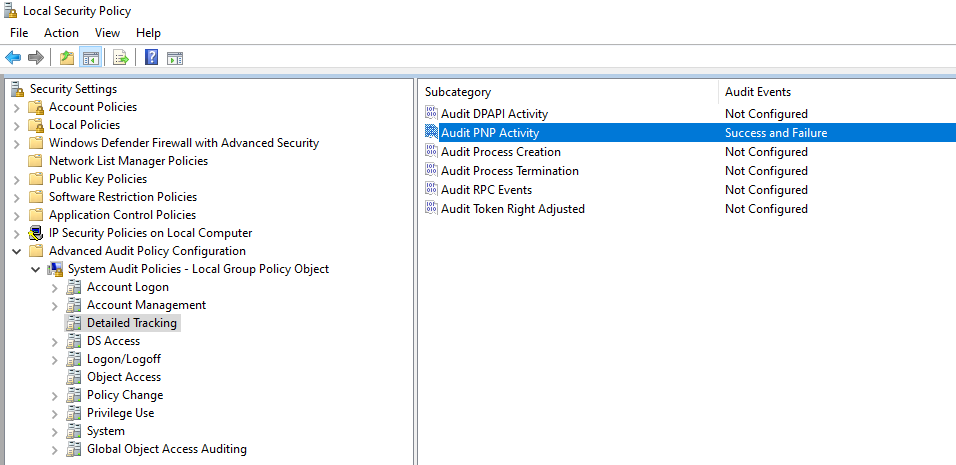
To enable logging of this event, the following security policy must be configured::
Local Security Policies > Advanced Audit Policy Configuration > System Audit Policies > Detailed Tracking > Audit Plug and Play Activity
Set the policy to "Success and Failure".
-
Event 6416 logging
Support for Windows event 6416 is available and allows automatic logging of external device connections through the Plug and Play mechanism.
In particular, storage-capable USB devices are tracked, including:
-
USB flash drives
-
External hard disks
-
USB smart cards
-
Other removable storage devices
The event is recorded under the WINLOG source, Plug and Play Events category, and includes the device type and hardware description.
-
Alert functionality
Event 6416 can be configured as an alert, enabling automatic notifications based on specific criteria, including:
-
Device insertion by a specific user
-
Connection on a specific machine
-
Detected device type
-
SOC module integration
The SOC module uses these events to:
-
Report the insertion of USB devices on specific PCs
-
Generate targeted notifications or alerts based on user or workstation
With the USB plugin enabled, advanced details are also available, including information about the contents of connected devices.
Spiega il log selezionato
This function uses an AI-powered semantic analysis engine to automatically interpret the content of a single Syslog event.
The system analyzes the message and provides a detailed explanation divided into sections:
-
What happened: describes the detected event in natural language, indicating the user, device, and technical context (e.g., accesses, errors, or modifications).
-
Why it matters: explains the relevance of the event, highlighting risks, vulnerabilities, or security implications.
-
Actions: suggests recommended checks or verifications for managing the event or resolving the issue.
When specific information is not available for a given event, the Wiki tab displays the technical details of the event ID, along with possible alternative actions or suggestions for further investigation.


The explanation can be saved or exported as a PDF using the commands available at the bottom of the window.
AI Analysis
With a dedicated licence, the [AI Analysis] button is available in the log grids. Up to 100 events can be sent to the AI engine, which analyses them to automatically highlight critical or suspicious logs and provides a contextual evaluation that is easy to read, even for non-expert users.
The purpose is to offer advanced interpretative support, improve understanding of security logs, and speed up the identification of potentially risky actions.
If more than 100 events are selected, the system reports the excess and processes only the first 100.
The generated report can be printed and exported.