
Print Logs
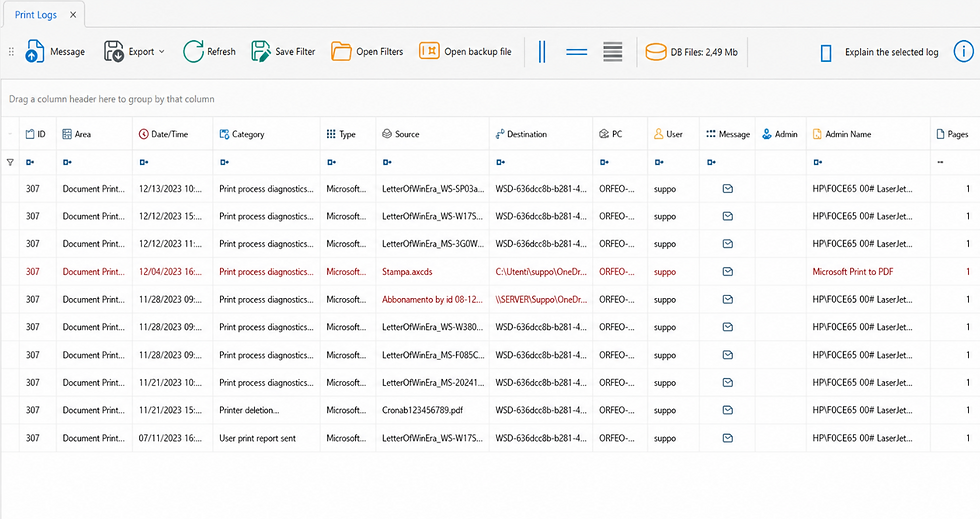
This plugin enables the recording of print logs. Any print job sent to any printer, including virtual printers, can be tracked.
The following information is recorded in the log:
-
Source PC
-
User who initiated the print job
-
Source file (file title only)
-
Destination port or destination file in the case of virtual printers, for example PDF
Activation
Print logging is not enabled by default on any client. To enable it, proceed as follows:
1. Open Event Viewer
2. From the menu on the left, navigate to Applications and Services Logs > Microsoft > Windows > Print Service > Operational.

3. Right-click and select Enable Log.
4. This operation can also be managed through Group Policy:
Hive: HKEY_LOCAL_MACHINE
Key Path: SOFTWARE\Microsoft\Windows\CurrentVersion\WINEVT\Channels\Microsoft-Windows-PrintService/Operational
Value Name: Enabled
Value Type: REG_DWORD
Value Data: 00000001

5. From the Registry, navigate to: Computer\HKEY_LOCAL_MACHINE\SOFTWARE\Policies\Microsoft\Windows NT
6. Create the "Printers" key

7. Create the ShowJobTitleInEventLogs entry (New > DWORD 32 bit value)

This registry key is required to capture the document title sent to the printer. Without it, the field remains empty.It is recommended to configure this key through Group Policy to allow mass deployment across machines.

NOTE: Print logging becomes active on clients after the Group Policy is applied and the system is restarted.