
Set Up
Initial Wizard
Important note: it is recommended to install BusinessLog on a server other than the Domain Controller.
The BusinessLog server must be located in the main domain, but it is not necessary to install it directly on the Domain Controller.
The configuration procedure and the BusinessLog service will communicate remotely with the Domain Controller and the target machines, using the required authorizations and network communications.
At the end of the setup, the initial configuration and registration will start:
To register the license, the machine must have access to the internet.
The domain for the license registration is: https://api.businesslog.it
Refer to this table for the ports required for the program to operate correctly.
To register, you must enter the Username and Password that you received to activate the product.

Fill in the missing information with the end customer's header and enter a valid email address for license-related communications:

Once the registration is complete, BusinessLog suggests continuing with the Assisted Setup.
You can start the procedure right away or call it up later from the login screen.


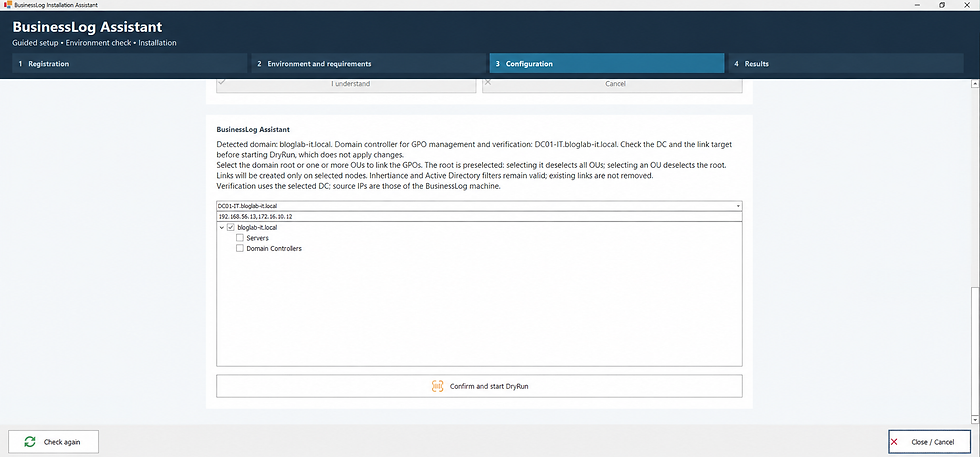
The assistant automatically detects the domain, the domain controller, and the available OUs.
Before applying changes, you can run a DryRun to check the environment and review the planned configurations.
At the end of the DryRun, the results of the checks performed are shown.
From this screen, you can check diagnostics, the log, the AI report, or prepare any corrections.

After the DryRun, the operations plan to be applied is prepared.
Each action can be checked before the final approval.

Before running, the user can choose the operations to apply.
Changes are made only after explicit approval.
